Context
In September 2026 I started looking for my next remote role. Reviewing a job posting and tailoring a resume specifically for it could take me hours to days just to reach a first draft I could send around for feedback. I wanted that step to be faster without losing the judgment about what achievements and experience best signal my fit to include in a resume.
What I built
I defined my job search goals and criteria, built the workflow, and review everything it produces.
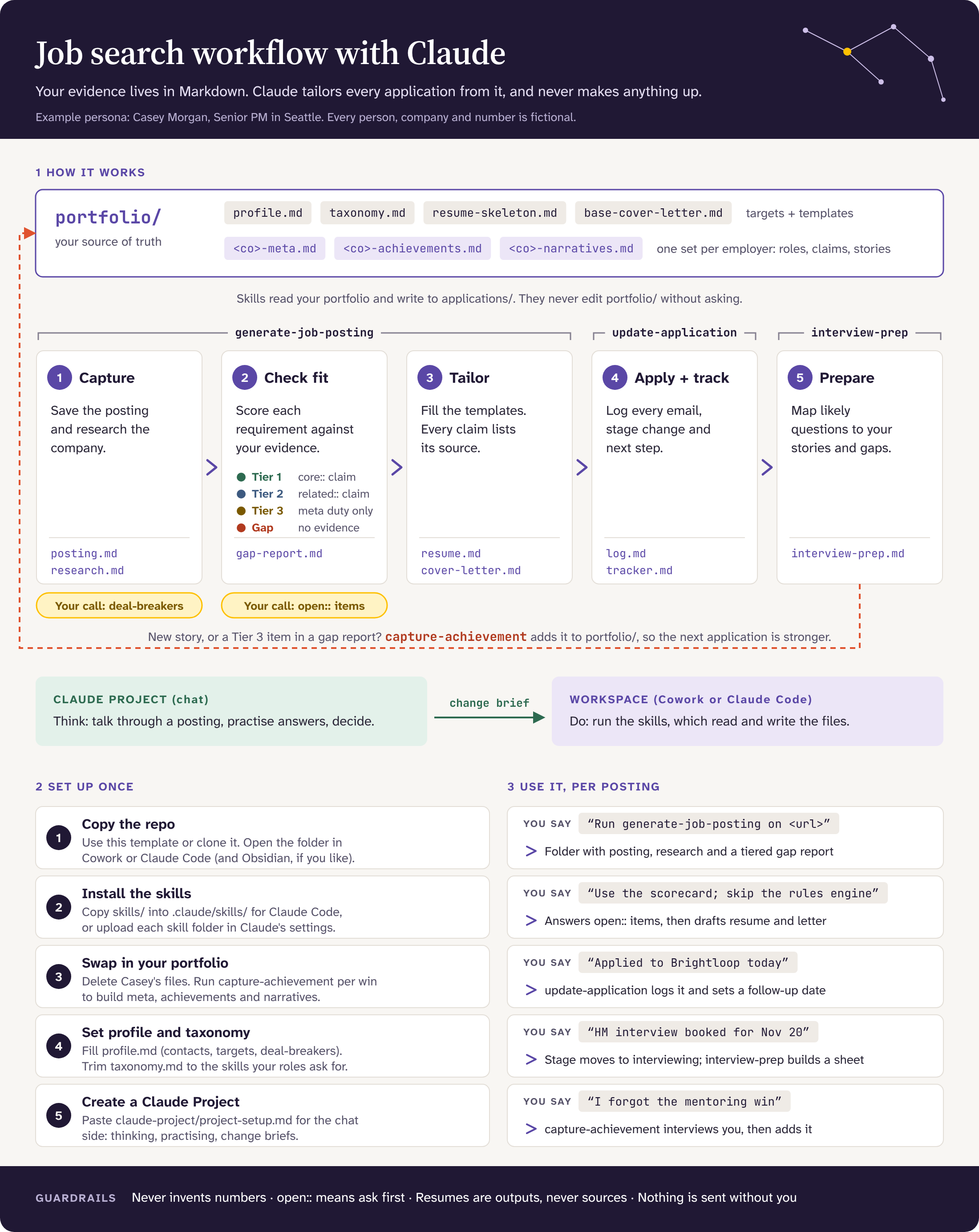
How it works
- A work portfolio as context. Achievements and narratives from my past roles, each aligned to core skills are stored within an Obsidian vault and used for context.
- Explicit goals. A compensation floor and target, culture fit, deal-breakers, and location preferences are defined within the portfolio vault.
- Posting intake. Given a URL, an agent (Claude in my case) pulls the posting, researches the company, and creates a company profile and a contact log. It then assesses the role and company against my goals and drafts a resume and cover letter that call out my strengths and weaknesses for the role.
- Status tracking. Each posting moves through stages such as Researching, Applied, Interviewing, and Withdrawn, with notes from conversations with contacts and recruiters.
- A daily at-a-glance task. It summarizes where every posting stands and reminds me to follow up or finish an application package.
Key decisions
- Plain Markdown as the foundation. I use Obsidian at work and at home and think in Markdown, so building on it kept everything as files I can read, search, and edit, with Claude doing initial job posting research & assessment and generating drafts.
- Assess before drafting. Checking a posting against my stated goals comes first, so the draft resume reflects an honest read of the fit.
- I edit every draft. The workflow produces a first draft and I decide what goes out.
Outcome
A first draft that used to take me hours to days is now generated in seconds-to-minutes. I spend about an hour editing the output and I can get feedback from my colleagues quickly before I apply.
What surprised me
I expected to work mostly inside Obsidian. In practice I review and edit the generated files in VS Code, where I’m more comfortable working with the Claude Code extension. I still start in Obsidian when I’m ideating, drafting, and deciding what to work on next.
Where to find it
The workflow is available as a repo template on GitHub here: https://github.com/pyremonk/claude-job-search-workflow